No-Code Test Automation
Record a journey once. Get a test that runs across browsers and repairs itself when the UI changes.
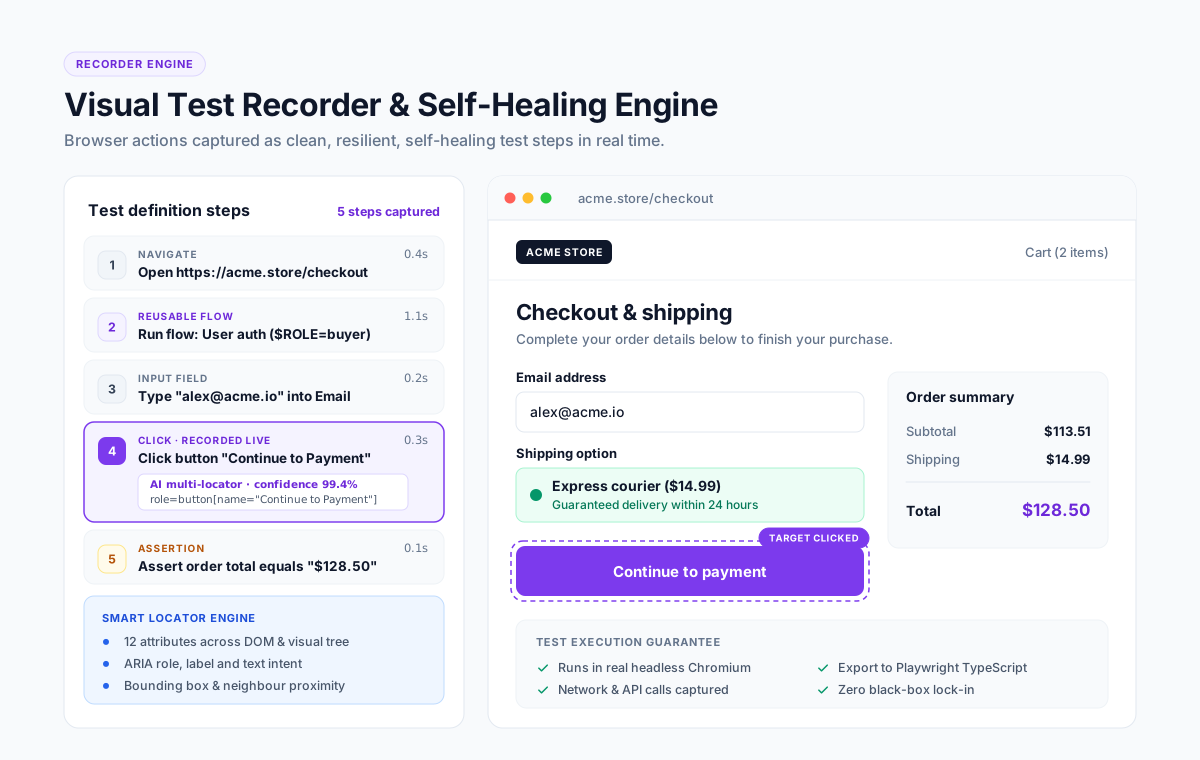
No-code test automation is a way to build automated software tests without writing code. You perform the journey in the browser, the tool records each step as a structured action, and the result is a test that can be re-run, scheduled and shared. Codeless, scriptless and low-code testing describe the same approach with slightly different amounts of scripting allowed.
What is no-code test automation?
A no-code test is built by demonstration rather than by programming. You open your application, complete a flow such as sign-up or checkout, and the recorder captures every click, input and assertion as a step you can rename, reorder or parameterise afterwards. Nothing is a black box: each step stays visible and editable in a step editor.
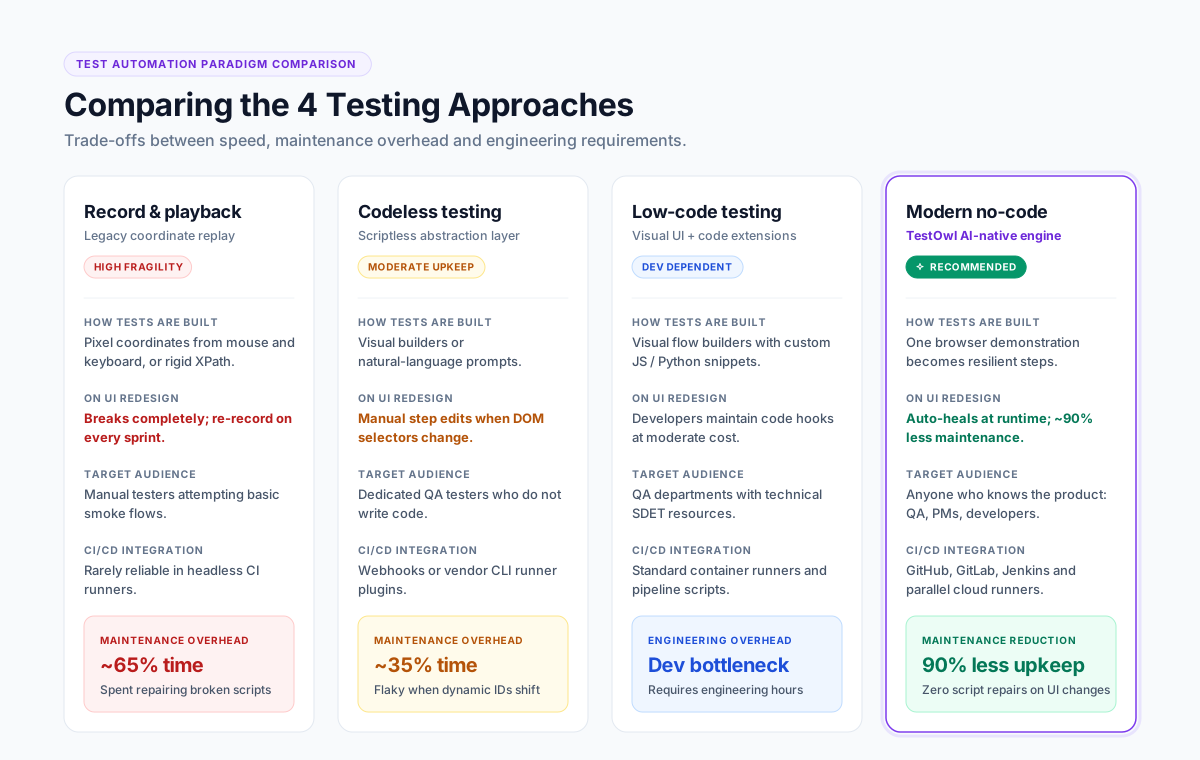
The three terms buyers use interchangeably are worth separating once:
| Term | What it usually means | Who it suits |
|---|---|---|
| No-code testing | Tests are built entirely through a recorder and editor | QA analysts, product owners, manual testers |
| Codeless testing | The same thing; the word favoured by enterprise vendors | Same audience |
| Low-code testing | Mostly visual, with an escape hatch for custom code snippets | Teams with mixed skills |
| Record and playback | The oldest form: replay a recording, with little structure around it | Quick one-off checks |
Quotable definition
“No-code test automation moves test creation from the people who can write code to the people who know the product.”
Why teams move to no-code testing
The reason is rarely “we cannot code”. Most QA teams can. The reasons that come up in practice are:
Automation backlog
Two automation engineers cannot cover a product that ships weekly. Letting five manual testers build tests changes the arithmetic.
Maintenance cost
Script-based suites break on every UI change, and repairing them consumes the time that was meant for new coverage.
Onboarding time
A new tester is productive in a recorder in a day, and in a framework in a month.
Release confidence
A regression pack that anyone can extend gets extended.
What good no-code tools do that early record-and-playback tools did not
Record and playback got a bad reputation for a reason: a recording that only replays coordinates breaks constantly. A modern no-code platform differs in four ways.
Structured steps, not coordinates
Each step stores the intent — "click the Submit button" — with several ways to find that element again.
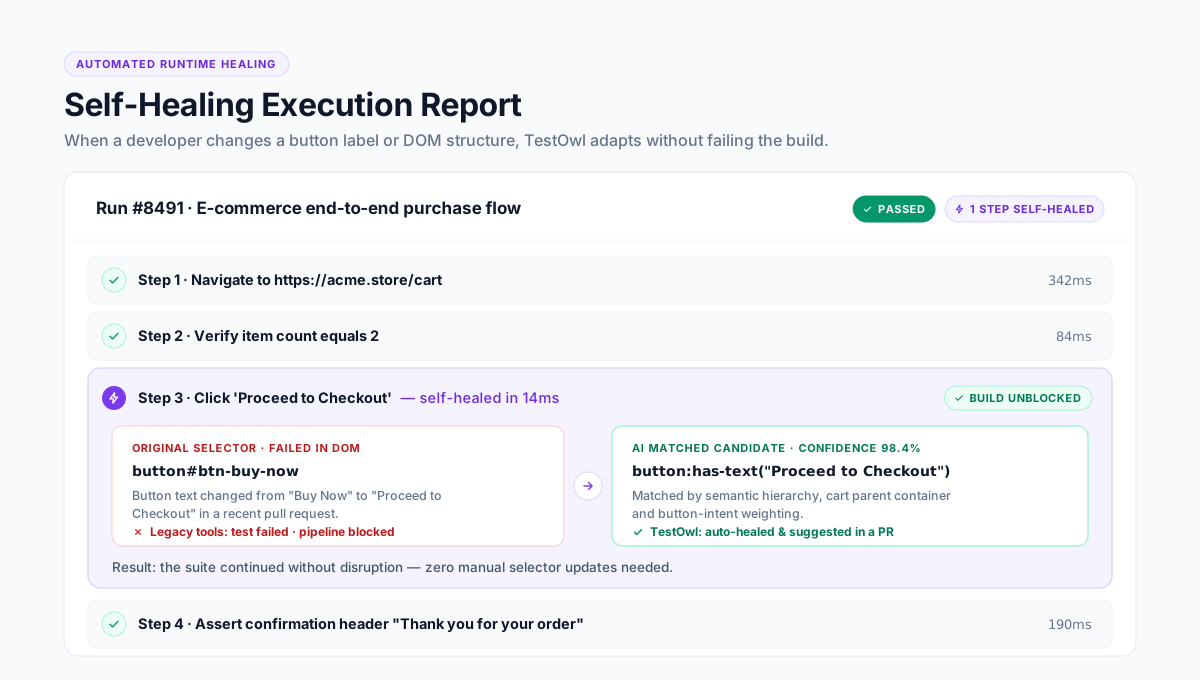
Self-healing
When a locator changes, the tool re-identifies the element from its other attributes and continues, then reports what it healed.
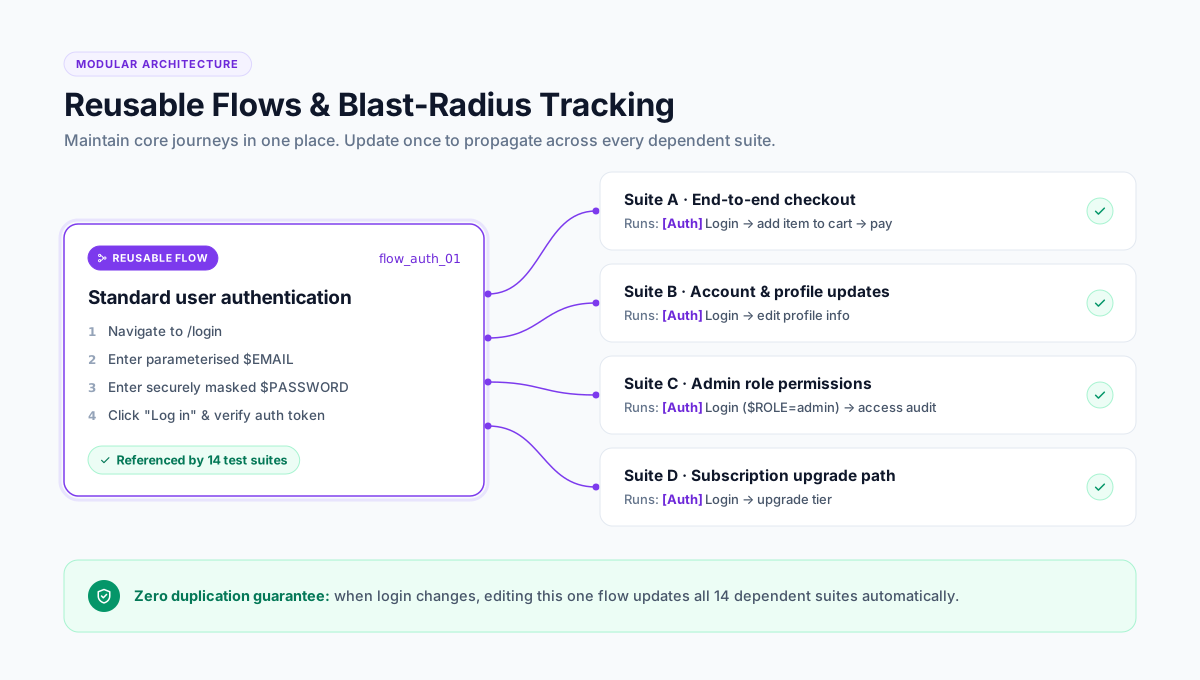
Reusable flows
Shared journeys like login are maintained in one place and referenced by every test that needs them.
Real data handling
Parameterised inputs, generated test data, and encrypted secrets instead of passwords typed into steps.
Where no-code testing fits, and where it does not
Clarity on boundaries is what separates reliable automation from expensive failed initiatives.
Where It Fits
It fits: browser-based regression, smoke tests before release, cross-browser checks, form and workflow validation, and repeated end-to-end journeys.
- User journey regression
- Multi-step checkout & signup verification
- Cross-browser compatibility validation
Where It Does Not Fit
It does not fit: unit tests, deep API contract testing, performance and load testing, and anything that needs custom logic beyond what the step editor exposes. Those stay in code, and that is the right answer.
For deep logic and unit level assertions, refer to primary documentation for code-based frameworks: Selenium Docs, Cypress Docs, and Playwright Docs.
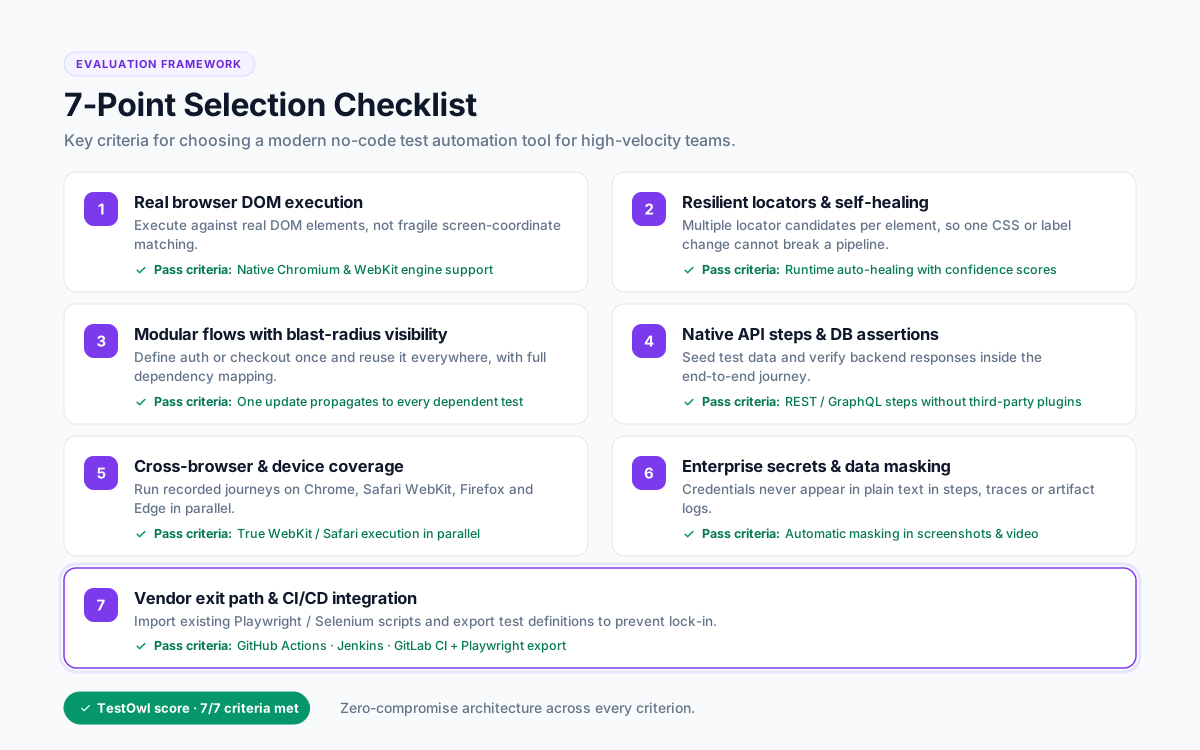
How to choose a codeless testing tool: 7 checks
Before committing your engineering or QA roadmap to any vendor, run these seven practical checks:
Record your hardest screen first — not the vendor demo site.
Test your real application workflows right away, rather than a polished demo environment.
Shadow DOM, iframes, drag-and-drop and data grids.
This is where most recorders fail.
Transparent self-healing.
The run report must say what was healed and why.
Reusable steps.
Without them, maintenance simply moves from code to clicks.
Cross-browser and device coverage.
Chrome, Firefox, Safari, Edge at minimum across 30+ device profiles.
Secrets and data masking.
Test credentials should never sit in plain text in a step.
An exit path.
Can you export, integrate with CI (GitHub Actions, Jenkins, GitLab CI), and import the scripts you already have?
Where TestOwl fits
TestOwl is an AI-native, no-code test automation platform for web applications. You record a journey once with the Chrome extension; TestOwl turns it into a resilient test, runs it in parallel across Chrome, Firefox, Safari and Edge plus 30+ device profiles, heals it when the UI changes, and explains the root cause when a test genuinely fails.
Specific rather than generic:
Hard DOM handled natively
Shadow DOM, nested iframes, drag-and-drop libraries and data grids such as AG Grid.
Flows
Reusable step groups maintained once and used everywhere, with a "used in" count so you can see the blast radius before you edit.
Secrets and Masking Rules
Encrypted credentials, and sensitive values hidden in reports and logs.
Import what exists
Bring existing Playwright, Cypress, Selenium, Robot Framework (and more) scripts rather than rewriting them.
Cloud or on-premise
Including private deployment for teams that cannot send test data outside their network.
Time to value
Teams are typically running their first suites within 3 days.
Measured Value: TestOwl's own positioning is up to 10x faster test creation and around 90% less maintenance than hand-written scripts. Validate that in a pilot on your own application rather than taking it on trust.
Key takeaways
- No-code test automation means building tests by demonstration, not by programming.
- Codeless, scriptless and low-code describe the same approach with different amounts of scripting.
- The difference between modern no-code and old record-and-playback is structured steps, self-healing and reusable flows.
- Keep unit, API and performance testing in code; move browser regression to no-code.
- Judge tools on your hardest screen, not the demo site.
Explore Related Test Automation Resources
Frequently Asked Questions
No-code test automation is a way to create automated software tests without writing code. You perform a journey in the browser, the tool records each step as a structured action, and the result is a repeatable test that can run across browsers and be scheduled in CI.
There is no practical difference. Both describe test creation through a recorder and visual editor. Low-code implies the same approach with an option to add custom code, and scriptless is another synonym used by enterprise vendors.
Yes, when the tool uses structured steps and self-healing rather than replaying raw recordings. Modern platforms store several signals per element and re-identify it after a UI change, which is what old record-and-playback tools could not do.
For broad UI regression, usually yes. For deep custom logic, API-level control and unit testing, code-based frameworks remain the right tool. Many teams run both and import existing Selenium tests rather than rewriting them.
Anyone who knows the product: manual testers, QA analysts, product owners, support engineers. That is the point — test creation stops being limited to the two people who know the framework.
There are open-source recorders, though most lack self-healing and reporting. Commercial platforms including TestOwl offer trials and pilots so the maintenance saving can be measured before committing.