AI Test Automation
What AI actually automates in software testing — and how to judge an AI testing tool before you buy one.
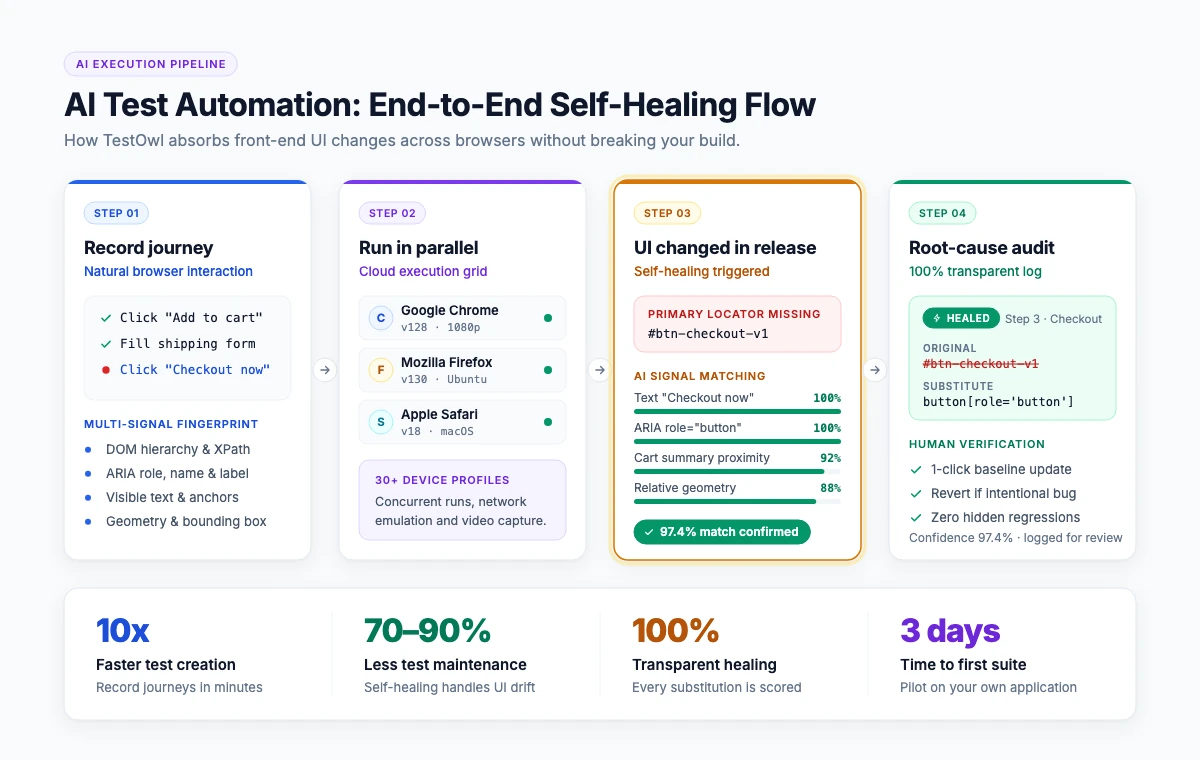
AI test automation is the use of artificial intelligence to create, maintain, run and diagnose software tests. In practice it means four things: turning a recorded user journey into a test, repairing locators when the UI changes (self-healing), choosing which tests to run, and explaining why a test failed. It does not remove the need for human test design — it removes the manual rework around it.
What is AI test automation?
AI test automation applies machine learning and, increasingly, large language models to the parts of testing that used to be manual maintenance work. A traditional automated test is a script: it finds elements by a fixed locator and fails the moment that locator changes. An AI-based test keeps multiple signals about each element — its position, its label, its role, its neighbours — and uses them to find the same element again after the interface changes.
The term covers a wide range of products. It is worth being precise about what is actually automated:
| What AI does | What it replaces | Maturity |
|---|---|---|
| Turns a recorded journey into a structured test | Hand-writing Selenium, Cypress or Playwright code | Production-ready |
| Heals locators when the UI changes | Manually updating selectors after every release | Production-ready |
| Explains the root cause of a failure | Reading stack traces and re-running locally | Production-ready |
| Generates test data | Writing fixtures by hand | Production-ready |
| Suggests new test cases from a spec or a user flow | Manual test design | Emerging |
| Decides which subset of tests to run per commit | Running the full suite every time | Emerging |
Quotable definition
“AI test automation is test automation where the tool, not the engineer, absorbs the cost of change.”
What problem does AI actually solve in testing?
Test maintenance. In a code-based framework, every release that touches the front end can break a set of tests that were working the day before. The test did not find a bug — the locator moved. Teams then spend their automation time repairing their own suite instead of extending coverage.
AI addresses this in three places:
- 01At creation. You perform the journey once in the browser; the tool records the intent of each step, not just the click coordinates.
- 02At run time. When an element cannot be found by its primary locator, the tool falls back to the other attributes it captured and continues the run instead of failing.
- 03After the run. Instead of a red “element not found”, you get the reason: the element moved, the label changed, the page did not finish loading, the API behind the step returned a 500.
This is why “self-healing” and “AI test automation” are usually the same conversation. Self-healing is the single feature that decides whether an automated suite survives a fast release cycle.
How does self-healing actually work?
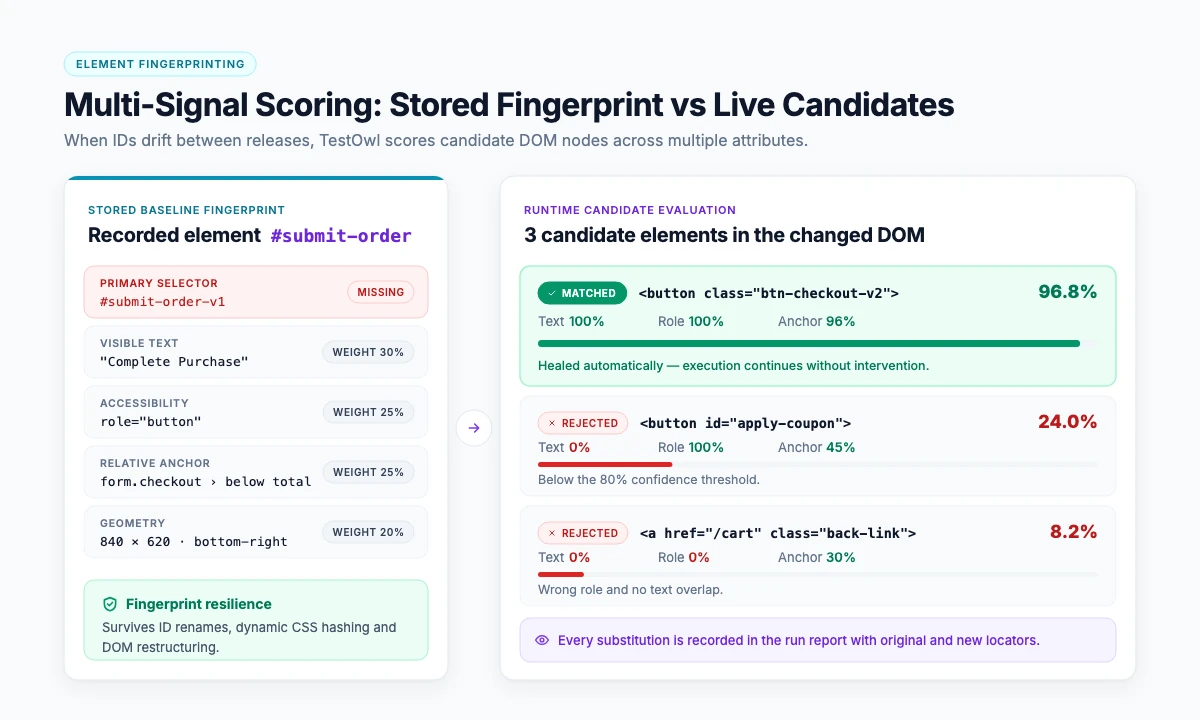
When a test is recorded, a self-healing tool stores a fingerprint of every element: the DOM path, the ID or name, the visible text, the ARIA role, the nearby labels, and the element's position relative to stable anchors. At run time it tries the primary locator first. If that fails, it scores the candidates on the page against the stored fingerprint and picks the best match, then reports which locator it used and why.
Two things separate a serious implementation from a shallow one:
- It tells you what it healed. A tool that silently substitutes elements will eventually pass a test that should have failed. The healing decision must appear in the report.
- It handles the hard DOM. Shadow DOM, nested iframes, drag-and-drop libraries and virtualised data grids (AG Grid and similar) are where most recorders give up. Ask for a demo on your own application, specifically on these components.
What AI test automation cannot do
Be direct with your team about the limits, because over-promising here is how automation programmes lose credibility:
- It cannot decide what is worth testing. Coverage strategy, risk, and acceptance criteria are still human decisions.
- It cannot test what it cannot reach. If a flow needs a specific data state, the environment still has to provide it.
- It cannot fix a flaky application. Race conditions in the product show up as flaky tests; the tool can report them, not remove them.
- It is not a replacement for exploratory testing. AI runs what it has been shown. Finding the unexpected is still a human skill.
AI test automation vs traditional test automation
| Dimension | Traditional (Selenium, Cypress, Playwright) | AI test automation |
|---|---|---|
| Who writes the test | Engineers, in code | Anyone who can perform the journey |
| Time to first test | Hours to days, after framework setup | Minutes |
| When the UI changes | Locators break; someone fixes them | Locators heal; the run continues |
| Failure output | Stack trace | Root-cause explanation |
| Skills needed | Programming, framework knowledge | Product knowledge |
| Best at | Deep custom logic, API-level control | Broad UI regression coverage that has to keep up with releases |
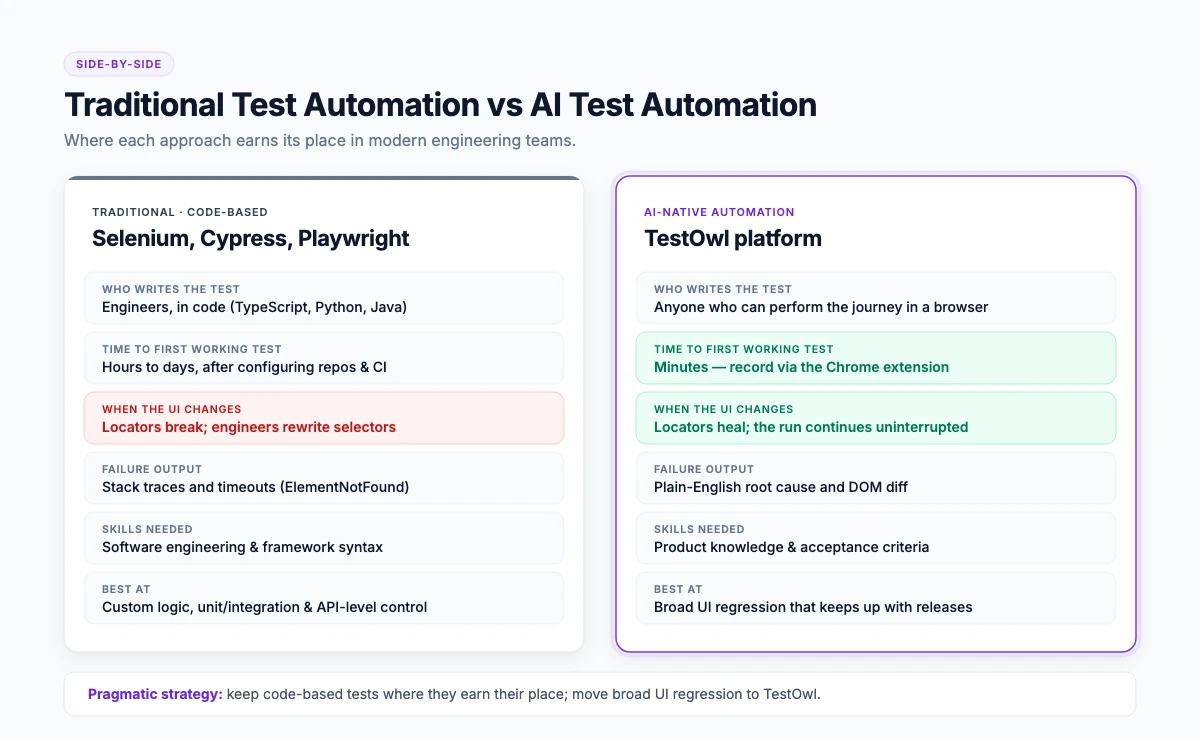
The honest answer for most teams is that these are not mutually exclusive: keep your code-based tests where they earn their place, and move the broad UI regression suite to something that maintains itself. Tools that let you import existing Selenium, Cypress or Playwright scripts make that transition cheaper — TestOwl's Import Wizard is built for exactly this.
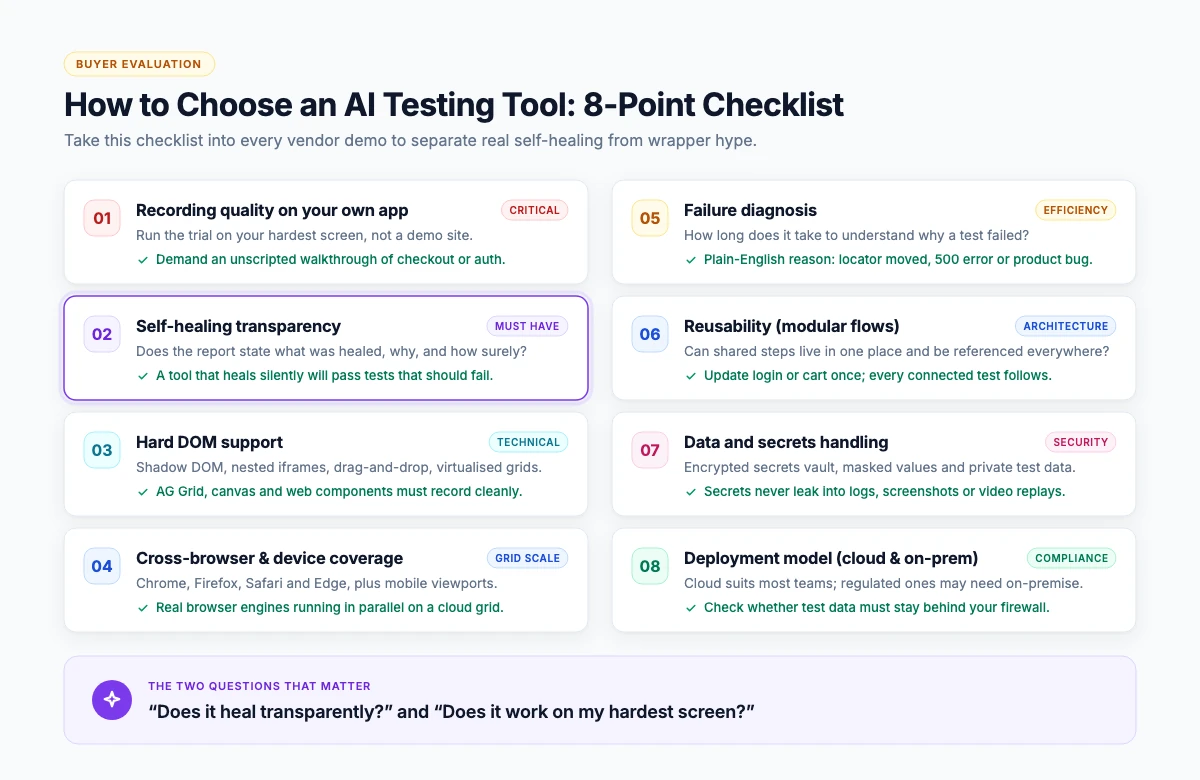
How to choose an AI testing tool: an 8-point checklist
- 01Recording quality on your own app. Run the trial against your hardest screen, not the vendor's demo site.
- 02Self-healing transparency. Does the report say what was healed and why?
- 03Hard DOM support. Shadow DOM, nested iframes, drag-and-drop, data grids.
- 04Cross-browser and device coverage. Chrome, Firefox, Safari and Edge at minimum, plus the devices your users actually have.
- 05Failure diagnosis. How long does it take to know why a test failed?
- 06Reusability. Can shared steps be maintained in one place and used across tests?
- 07Data and secrets handling. Encrypted secrets, masked values in reports and logs.
- 08Deployment model. Cloud is fine for most teams; regulated environments need an on-premise or private option.
Quotable checklist line
“The two questions that separate AI testing tools are ‘does it heal transparently?’ and ‘does it work on my hardest screen?’”
Where TestOwl fits
TestOwl is an AI-native, no-code test automation platform for web applications. You record a journey once in the browser using the Chrome extension; TestOwl turns it into a resilient test, runs it in parallel across Chrome, Firefox, Safari and Edge and 30+ device profiles, heals it when the UI changes, and explains the root cause when something genuinely breaks.
What is specific rather than generic about it:
- Built for the hard DOM. Shadow DOM, nested iframes, drag-and-drop libraries and data grids such as AG Grid are handled natively.
- Reusable Flows. Login, checkout and other shared journeys are maintained once and referenced everywhere — see the Flows documentation.
- Secrets and masking built in. Passwords, API keys and tokens are stored as encrypted Secrets, and Masking Rules keep sensitive values out of reports and logs.
- Import what you already have. Existing Selenium, Cypress and Playwright scripts can be brought in rather than rewritten.
- Cloud or private deployment. TestOwl Cloud, or on-premise for teams that cannot send test data outside their network.
- Time to value. Teams are typically running their first suites within 3 days.
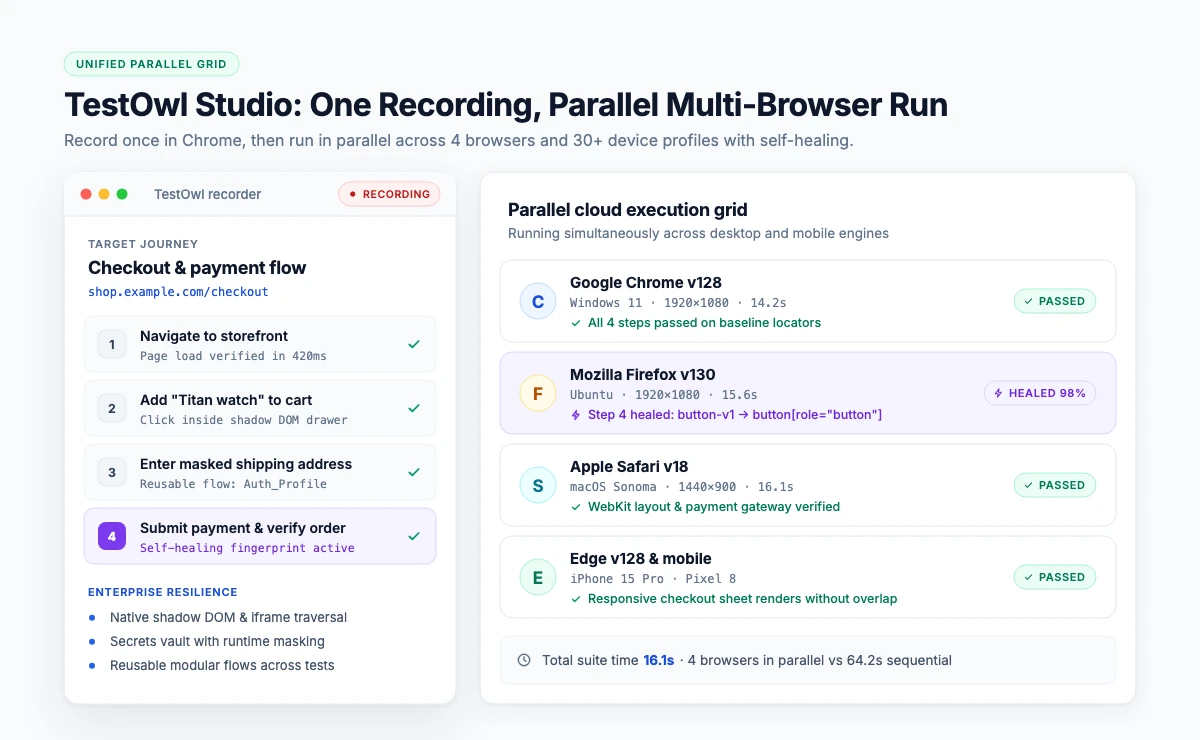
TestOwl's own positioning is up to 10x faster test creation and around 90% less test maintenance compared with hand-written scripts. Treat those as claims to verify in a pilot on your own application — which is exactly what the 4-week pilot is for.
Getting started in four steps
- 01Pick one journey that breaks often. Usually login, checkout or a multi-step form.
- 02Record it once in the browser with the TestOwl recorder.
- 03Run it across browsers and look at what healed and what genuinely failed.
- 04Add it to CI and expand coverage one flow at a time.
Key takeaways
- AI test automation automates test creation, locator healing, failure diagnosis and test data — not test strategy.
- Self-healing is the feature that decides whether a UI suite survives a fast release cycle.
- Insist on transparent healing: a tool that heals silently will eventually hide a real bug.
- The hardest screens (Shadow DOM, iframes, data grids) are the right trial ground, not the vendor's demo site.
- Keep code-based tests where they earn their place; move broad UI regression to a self-maintaining tool.
Explore Related AI & Test Automation Resources
Frequently Asked Questions
AI test automation is the use of artificial intelligence to create, maintain, run and diagnose software tests. It typically covers recording a journey into a test, healing locators when the UI changes, generating test data, and explaining why a test failed, while test strategy stays with the team.
Traditional automation runs scripts with fixed locators that break when the interface changes. AI-based automation stores several signals per element and re-identifies it after a change, so the run continues. Traditional tools return stack traces; AI tools return root-cause explanations.
No. AI removes repetitive regression execution and maintenance, not test design. Deciding what to test, judging risk and exploratory testing remain human work. In practice, teams that automate regression spend more of their time on exploratory testing, not less.
The category includes TestOwl, along with several established platforms. Rather than a ranking, judge candidates on the same eight points: recording quality on your own app, healing transparency, hard-DOM support, browser and device coverage, failure diagnosis, reusability, secrets handling, and deployment model.
Open-source frameworks such as Selenium, Cypress and Playwright are free but are not AI-based; healing and diagnosis are add-ons you build or buy. Some commercial AI platforms, including TestOwl, offer trials and pilots so you can validate results before committing.
TestOwl focuses on web applications in Chrome, Firefox, Safari and Edge, plus 30+ device profiles. Other tools in the category extend to mobile and desktop. Match the tool to where your product actually runs.
By reporting every heal. A healed step should appear in the run report with the original locator, the substitute, and the confidence in the match, so a reviewer can confirm the substitution was legitimate.
Recording a first test takes minutes. A useful regression suite for one product area typically takes a few days. With TestOwl, teams are generally running their own suites within 3 days of starting.