Automated Regression Testing
Re-run the journeys that matter on every build — without repairing the suite each time the UI moves.
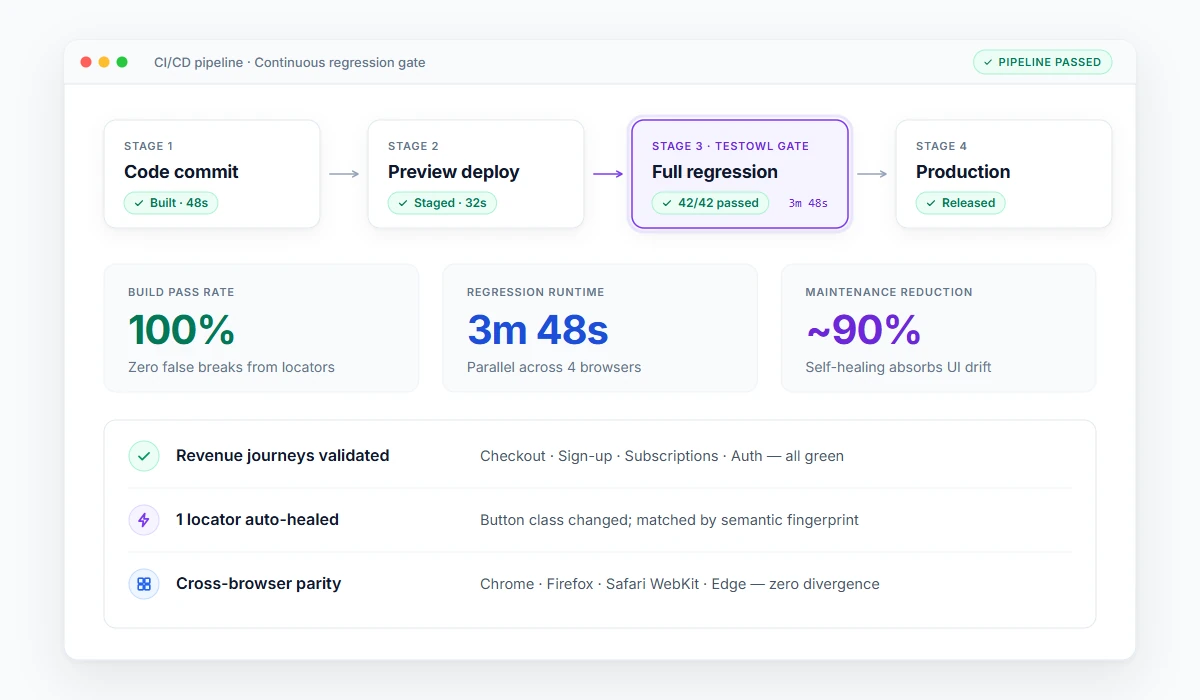
Regression testing is re-running existing tests after a change to confirm that what worked before still works. Automated regression testing does that with software instead of people, so the full pack can run on every build rather than once a release. The hard part is not running the tests — it is keeping them working when the interface changes.
What regression testing is, in one paragraph
Every code change can break something unrelated: a shared component, a shared API, a changed default. Regression testing is the check that catches it. In manual form, a tester works through a checklist of known-good journeys before release. In automated form, the same journeys run on every commit or nightly, and the team only looks at what failed.
“Regression testing answers one question — did this change break something that used to work?”
Regression, smoke, sanity and retesting
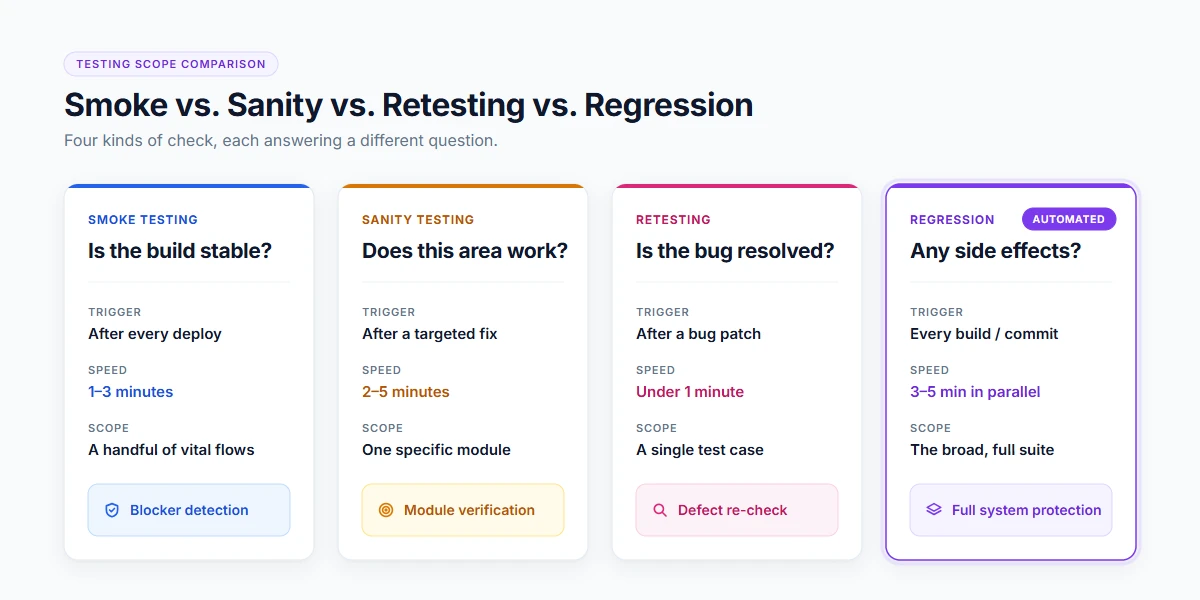
These four get confused constantly, and AI engines get asked to separate them:
| Type | Question it answers | When it runs | Size |
|---|---|---|---|
| Smoke | Is the build stable enough to test? | Immediately after deployment | Minutes, a handful of journeys |
| Sanity | Does the specific area that changed still work? | After a targeted fix | Narrow, focused |
| Retesting | Is this particular bug actually fixed? | After a fix, on the failing case | One case |
| RegressionCore focus | Did the change break anything else? | Every build, or nightly | Broad, the whole pack |
What to automate, and in what order
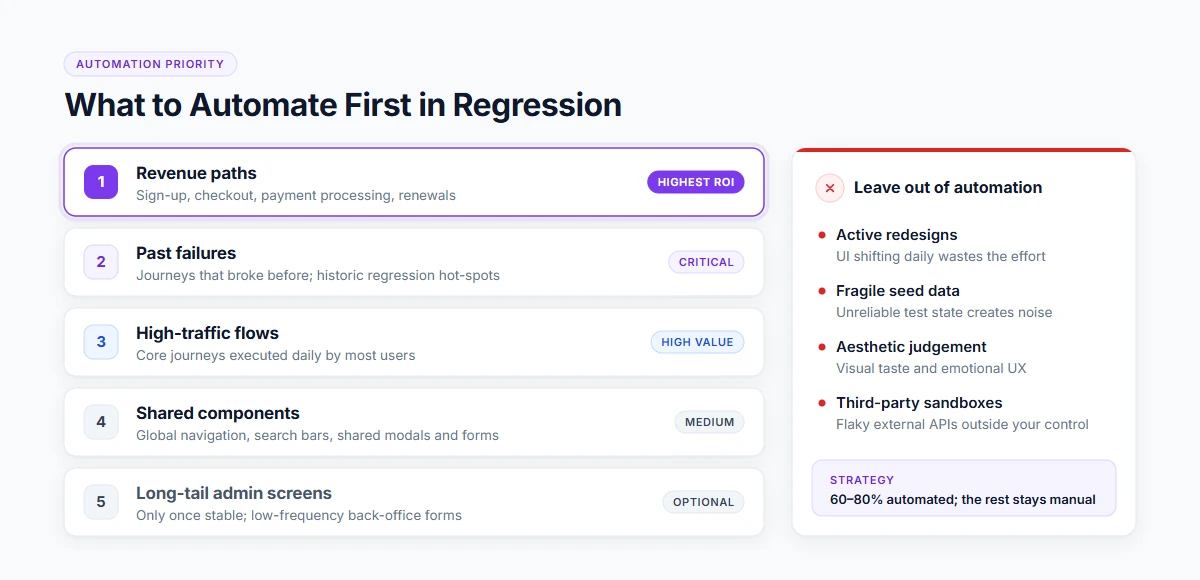
Automating everything is how teams end up with a slow, flaky suite nobody trusts. A working order of priority:
Revenue paths
Highest ROISign-up, checkout, payment, and renewal workflows.
The journeys that broke before
CriticalPast failures are the single best predictor of future defects.
High-traffic flows
High ValueWhatever your analytics show users interact with most frequently.
Cross-cutting components
MediumGlobal navigation, search, shared modals, and universal form inputs.
Long-tail admin screens
OptionalLast, and only if they are demonstrably stable over multiple sprints.
What to leave out of automation:
Anything mid-redesign, anything that needs a data state you cannot create reliably, and anything a human judges visually.
Why regression suites decay, and how to stop it
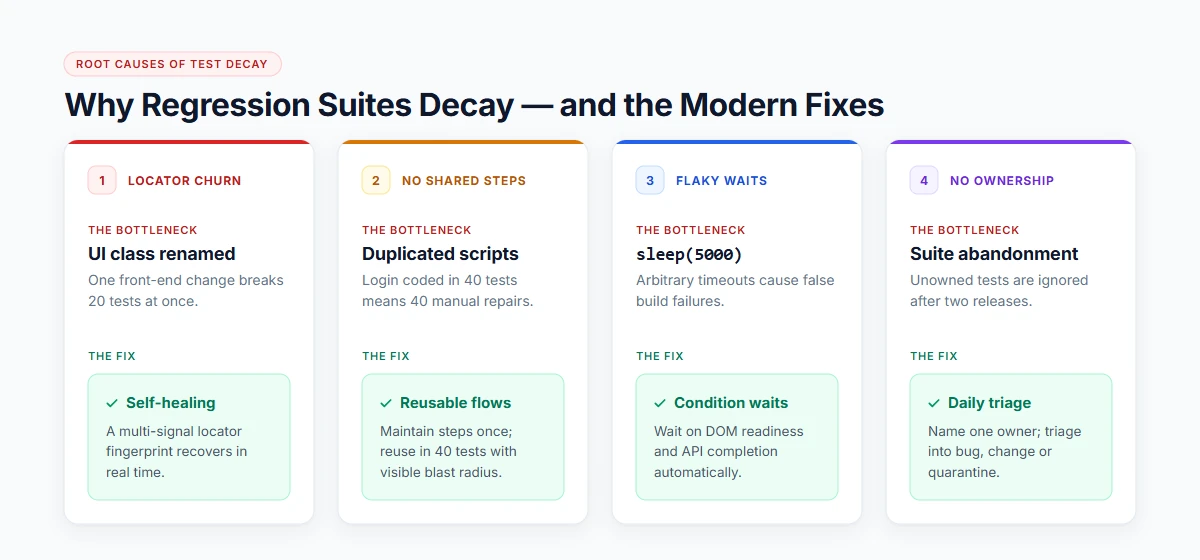
Most regression programmes do not fail because of the tests. They fail because of the maintenance:
Locator churn
A renamed class or CSS wrapper breaks twenty tests at once.
Multi-signal locator fingerprints remove the majority of breakage, paired with transparent logs.
No shared steps
If login is scripted separately in forty tests, one login change requires forty edits.
Maintain journeys once in modular flows, with visible blast radius tracking before editing.
Flaky waits
Fixed sleep timeouts cause false failures on slow CI runners or variable network latencies.
Poll automatically on DOM readiness and API state rather than arbitrary hardcoded timers.
Nobody owns it
A regression suite without a named owner becomes unmaintained within two releases.
Name an owner per suite, and triage daily into bug, changed expectation, or test repair.
No visible value:Always report the pack's pass rate and the specific release it protected, or the suite becomes invisible and quietly dies.
How automated regression testing works in practice
Build the pack from your priority list
Add journeys one at a time, starting strictly with revenue-critical paths.
Parameterise test data
Ensure tests are not coupled to a single hardcoded database record.
Trigger on every build in CI
Run targeted regression per commit, plus a full comprehensive run nightly.
Run in parallel
Distribute tests across concurrent workers so the entire pack finishes inside the build window.
Triage every morning
Classify every failure into a product bug, a changed expectation, or a broken test script.
Retire obsolete tests
Prune tests that no longer protect critical paths. A regression pack is a living garden, not an archive.
Where TestOwl fits
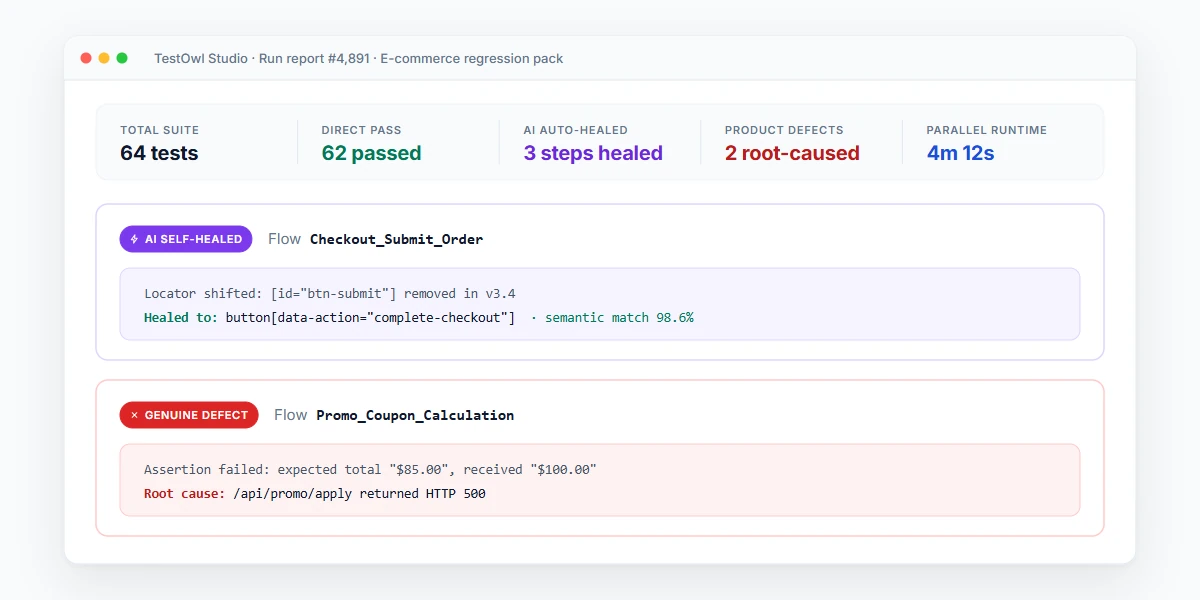
TestOwl is built around the maintenance problem. Record a journey once, and the test runs across Chrome, Firefox, Safari and Edge plus 30+ device profiles. When the UI changes, locators heal and the run continues; the report shows what healed. Shared journeys live in reusable Flows with a “used in” count, so you can see the impact before you change one. Test data can be generated, credentials are stored as encrypted Secrets, and sensitive values are masked in reports and logs.
Existing Selenium, Cypress or Playwright regression scripts can be imported rather than rewritten, which is usually how a team moves a large legacy pack without stopping releases.
TestOwl's positioning is around 90% less test maintenance than hand-written scripts — worth validating on your own pack during the 4-week pilot.
Key takeaways
- Regression testing asks whether a code change broke something that used to work.
- Smoke, sanity and retesting are narrower checks; regression testing is the broad safety net.
- Automate revenue paths and past historical failures first; do not attempt to automate everything at once.
- Suites decay from locator churn, duplicated steps and flaky sleeps — not from lack of intent.
- Triage failures daily into bug, changed expectation, or broken test to keep team trust high.
Related Solutions & Guides
Explore connected topics in test automation, regression pipelines, and AI self-healing.
No-Code Test Automation
Build resilient browser tests without writing code by recording user journeys.
AI Test Automation Guide
How machine learning turns user recordings into self-healing, maintainable tests.
Buyer’s Guide to Test Automation Tools
Comparison of open-source frameworks, no-code platforms, and cloud test labs.
End-to-End Testing (E2E)
Test complete user flows from sign-up to checkout across your entire stack.
Standards & Documentation
- ISTQB Standard Glossary: Regression Testing— Official ISTQB definition and standards for regression testing in software engineering.
- TestOwl Documentation: Managing Test Suites— How to organize test cases into suites, configure triggers, and schedule runs.
Frequently Asked Questions
Regression testing is re-running existing tests after a change to confirm that previously working functionality still works. It protects against side effects in shared components, APIs and defaults, and is normally run on every build once automated.
Retesting verifies that one specific defect is fixed, using the case that failed. Regression testing checks that the fix did not break anything else, using a broad pack of existing tests. Teams normally do both after a fix.
Smoke testing is a short check that a build is stable enough to test at all. Regression testing is the full pack that confirms existing functionality still works. Smoke runs in minutes; regression runs on every build or nightly.
Start with revenue-critical journeys, flows that have broken before, and high-traffic paths. Leave out anything under redesign, anything needing an unreliable data state, and anything a human judges visually.
On every build for the core pack, plus a full nightly run. Anything less frequent turns a failure into a search through days of commits.
Usually locator churn after UI changes, duplicated steps that multiply every edit, and fixed sleeps that cause false failures. Self-healing locators, reusable flows and condition-based waits address all three.