Loading…
Self-Healing Test Automation in TestOwl
Keep your automated tests reliable even when your application evolves and UI changes over time .
TestOwl automatically adapts to application changes, reducing test maintenance and keeping your tests running.
10x
Faster Test Development
Record your first test in under 30 seconds
90%
Less Test Maintenance
Self-healing automation adapts as your application evolves
30%
Shorter Dev Cycle
Reduce release bottlenecks
70%
Reduced Testing Effort
Focus on testing, not writing and maintaining tests
How Self Healing Works
01
Run Your Test
Execute your test as usual. No special setup, annotations, or maintenance workflows are required.
02
Detect What Changed
If an element moves, is renamed, or its attributes change, TestOwl automatically recognizes that the original locator no longer matches.
03
Find the Best Replacement
Instead of failing immediately, TestOwl analyzes multiple signals to locate the correct element.
04
Continue Without Breaking
The test proceeds using the updated locator, keeping your automation stable while reducing maintenance and flaky failures.
Self-Healing
What Self-Healing Can and Can't Do
Healing is applied automatically, with no approval step. Here is what TestOwl repairs on its own and what it leaves for you to update.
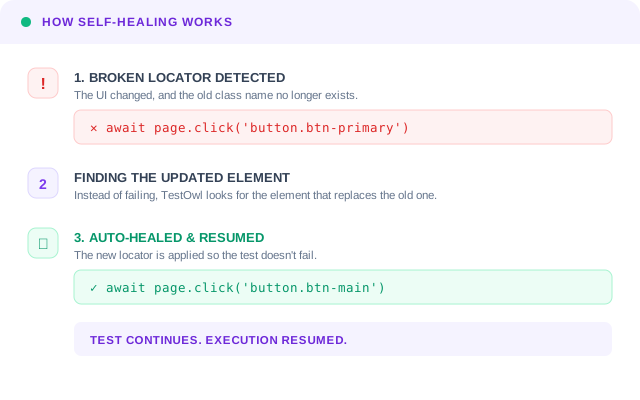
Example: a redesign renames a button's CSS class from btn-primary to btn-main. A script pinned to the old class fails. TestOwl finds the updated button and the test keeps running.
Script pinned to the old class
click('.btn-primary')Fails: the class no longer exists
With TestOwl
click('.btn-main')Healed: the test finds the updated button
| What changes | What TestOwl does |
|---|---|
| An element's ID or CSS class is renamed | Healed automatically The test finds the updated element and continues. |
| An element moves or its structure changes | Healed automatically The test finds the element in its new place. |
| An element's attributes change | Healed automatically The original locator is replaced for the run. |
| The element is removed from the page | Not healed The step fails, because there is nothing left to find. |
| An assertion changes (expected text or value) | Not healed Update the assertion in the test. |
Other Features
01
No-code recording
Every action captured instantly. No scripting required.
01
Navigate
app.testowl.ai
02
Click Login
button#submit
03
Input Auth
04
Assert UI
assert "Home"
01
Navigate
app.testowl.ai
02
Click Login
button#submit
03
Input Auth
04
Assert UI
assert "Home"
02
Cross-browser
Chrome, Firefox, and Safari covered natively.


03
Flexible environments
Test against staging, production, or local feature branches.
Environment: Production
↗BASE_URL
https://api.acme.com◈USER_AGENT
Chrome/124.0.0 (Linux)⇋THROTTLE
5Mbps / 20ms Latency⚿AUTH_HDR
Bearer token_7f29...x9⧉COOKIES
session_id, _ga, _pk_id04
Parallel runs
Execute multiple tests simultaneously in the cloud.
Cluster_Instance_v4
Thread_Countx64_VCPU
Sync_Rate0.4ms
05
Reusable test cases
Build a library of recordings. Combine them into complex flows.
06
Geolocation testing
Test your application from multiple regions across the globe.

07
Clear results
Pass/fail at a glance with comprehensive video replays.
ERR_0x99 ERR_0x99
ERR_0x99 ERR_0x99
ERR_0x99 ERR_0x99
ERR_0x99 ERR_0x99
ERR_0x99 ERR_0x99
ERR_0x99 ERR_0x99
Artifacts:
▒Console Logs
▣Screenshots
⇋Network HAR
08
Sensitive data masking
Automatically obfuscates passwords and PII in your test replays.
Sapphire SecurePREMIUM CREDIT
Card Number4111 2299 0042 8812
Card Holder
ALEXANDER NEWMANExpires
08/29CVV
39209
Test data federation
Manage and inject realistic test data seamlessly across scenarios.
Input generated
Analyzing...
Generating...
10
Smart Wait
Automatically waits for network requests and dynamic DOM updates.
shop.app.io/checkout/confirm
Pro Wireless Headset
Subtotal$149.00
Free ShippingVerified
Waiting for elements...
FAQ
Self-healing is the ability of a test automation tool to automatically detect when a UI element has changed and locate the correct replacement element, instead of failing the test.
No. Self-healing works automatically during normal test execution. No special setup, annotations, or maintenance workflows are required.
No. TestOwl applies the heal automatically while the test runs, so the run continues without a review step.
The step fails. Self-healing repairs a locator when the element still exists in a changed form. If the element has been removed, there is nothing to heal, and the failure points to a real change in the application.
It cannot fix a removed element or a changed assertion. If a page no longer has the element, or the expected text or value has changed, the test needs to be updated.