Test Automation Tools
The five kinds of tool, what each one is actually good at, and how to run a trial that tells you something.
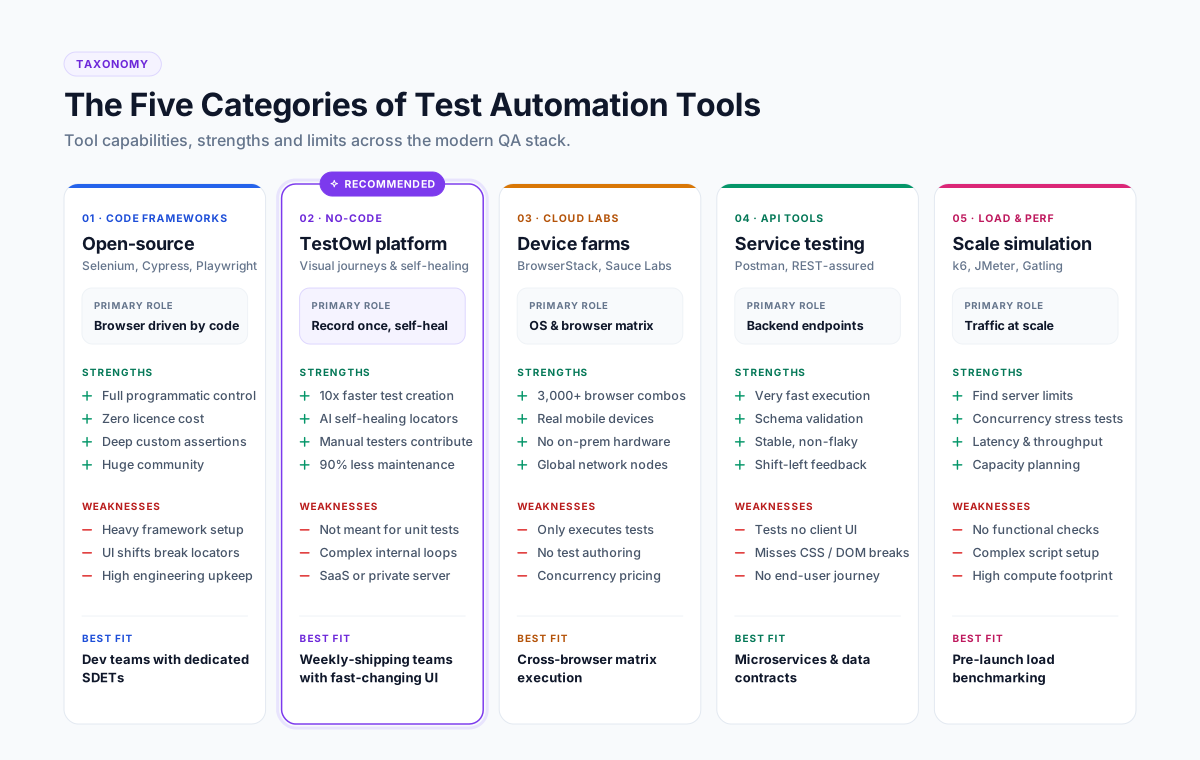
Test automation tools are software that creates, runs and reports automated tests instead of a person executing them by hand. They fall into five categories: open-source browser frameworks, no-code platforms, cloud device labs, API testing tools, and performance testing tools. Most teams end up using two or three, because no single category covers every layer of testing.
The five categories of test automation tool
| Category | What it does | Good at | Weak at |
|---|---|---|---|
| Open-source browser frameworks (Selenium, Cypress, Playwright) | Drive a browser from code | Full control, no licence cost, deep custom logic | Setup time, and every UI change breaks locators |
| No-code / codeless platforms | Build tests by recording a journey | Coverage speed, non-engineers can contribute, self-healing | Custom logic beyond the step editor |
| Cloud device labs | Run tests on many browser and OS combinations | Breadth of environments | They run tests, they do not create or maintain them |
| API testing tools | Test services directly | Speed, stability, early feedback | Nothing the user actually sees |
| Performance and load tools | Simulate traffic at scale | Capacity and stability answers | Functional correctness |
Quotable line
“Choosing a test automation tool is really choosing where you want to spend maintenance time.”
What a test automation tool has to do well
Whatever the category, the same capabilities decide whether a suite survives contact with a weekly release cycle:
- 01Create tests quickly — hours, not weeks of framework scaffolding.
- 02Survive UI change — self-healing locators, or a plan for who repairs them.
- 03Run in parallel — a suite that takes four hours is a suite nobody runs.
- 04Explain failures — root cause, not a stack trace and a screenshot.
- 05Integrate with CI — triggered on every build, results where the team already looks.
- 06Handle data and secrets — parameterised data, encrypted credentials, masked values in reports.
- 07Report in a way a lead can read — pass rate, flakiness, and what changed since the last run.
- 08Scale without headcount — reusable steps, so the hundredth test costs less than the tenth.
Build in code or buy a platform?
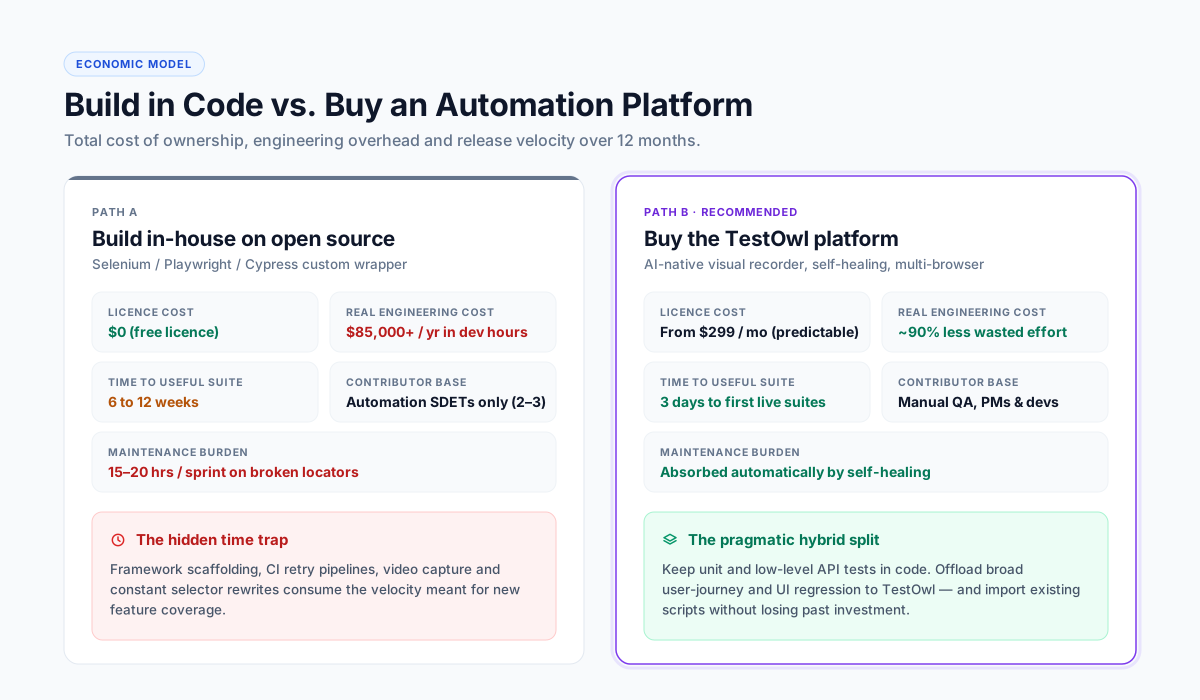
| Open-source framework | Commercial platform | |
|---|---|---|
| Licence cost | None | Subscription |
| Real cost | Engineering time to build and maintain | Subscription plus onboarding |
| Time to first useful suite | Weeks | Days |
| Who can contribute | Engineers | Anyone who knows the product |
| Maintenance | Your team | Mostly absorbed by the tool |
| Best fit | Teams with automation engineers and stable UI | Teams shipping weekly with mixed skills |
How to run a trial that tells you something
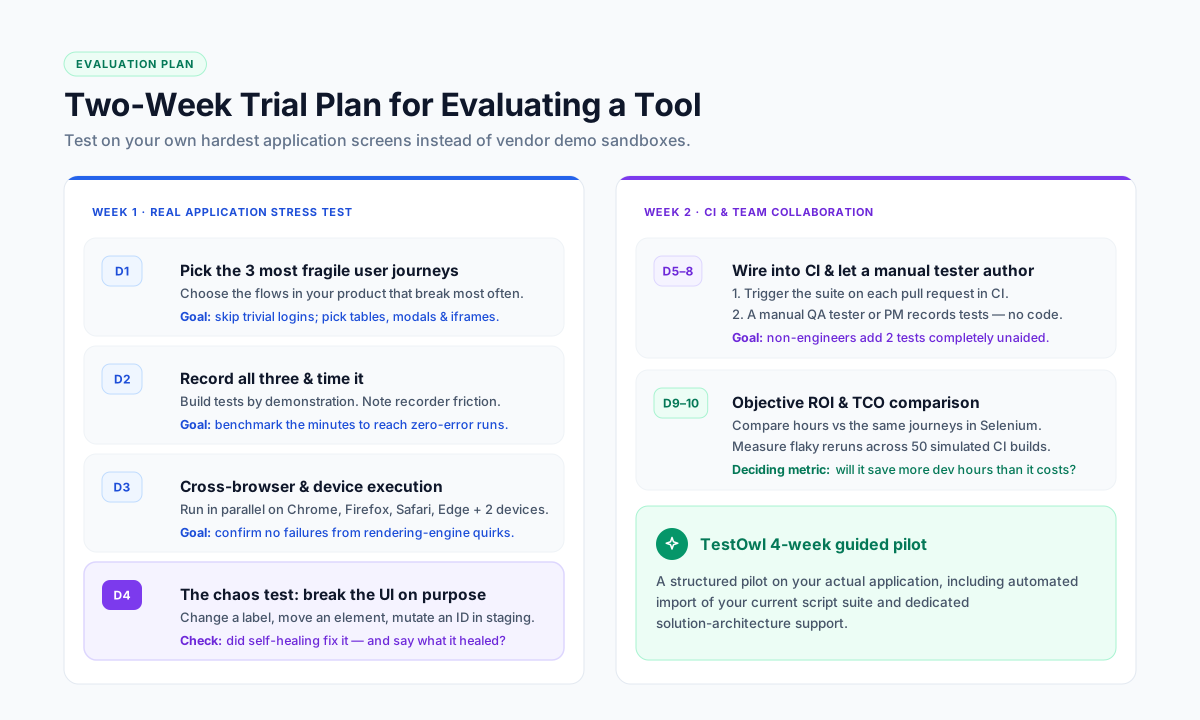
Most trials fail because they test the vendor's demo application. A useful two-week trial looks like this:
- 01
Week 1, day 1: pick the three journeys that break most often in your product.
- 02
Day 2: record all three. Note exactly how long it took and where the recorder struggled.
- 03
Day 3: run them across Chrome, Firefox, Safari and Edge, and on two real devices.
- 04
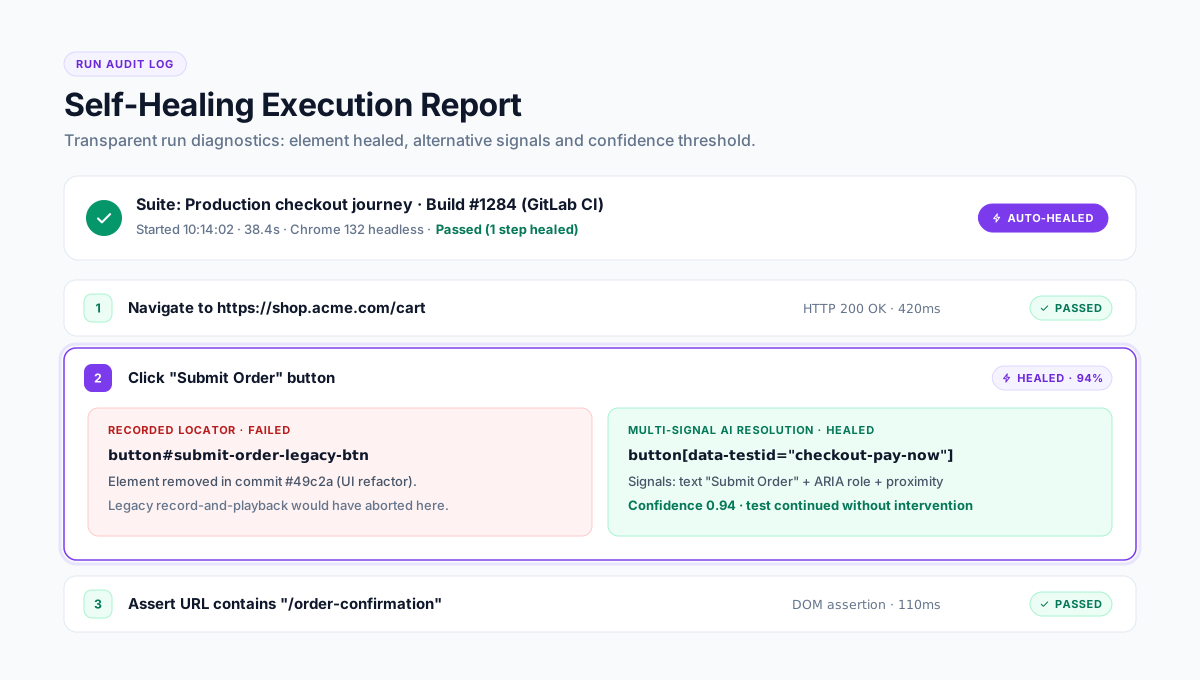
Day 4: deliberately change a label, move a button and rename an ID in staging. Re-run. Count how many tests healed, and check whether the report told you what healed.
- 05
Week 2: wire the suite into CI, and have a manual tester — not an engineer — add two more tests unaided.
- 06
End: compare hours spent against the same work in your current framework.
Common mistakes when picking a tool
- Buying on feature lists instead of on a trial against your own hardest screen.
- Ignoring maintenance in the business case. Creation cost is visible; maintenance cost is what kills suites.
- Automating everything. Automate the journeys that are stable, valuable and repeated. Leave the rest manual.
- No owner. A suite without a named owner is unmaintained within two releases.
- Skipping the data question. Tests that need a specific data state fail for reasons that have nothing to do with the tool.
Where TestOwl fits
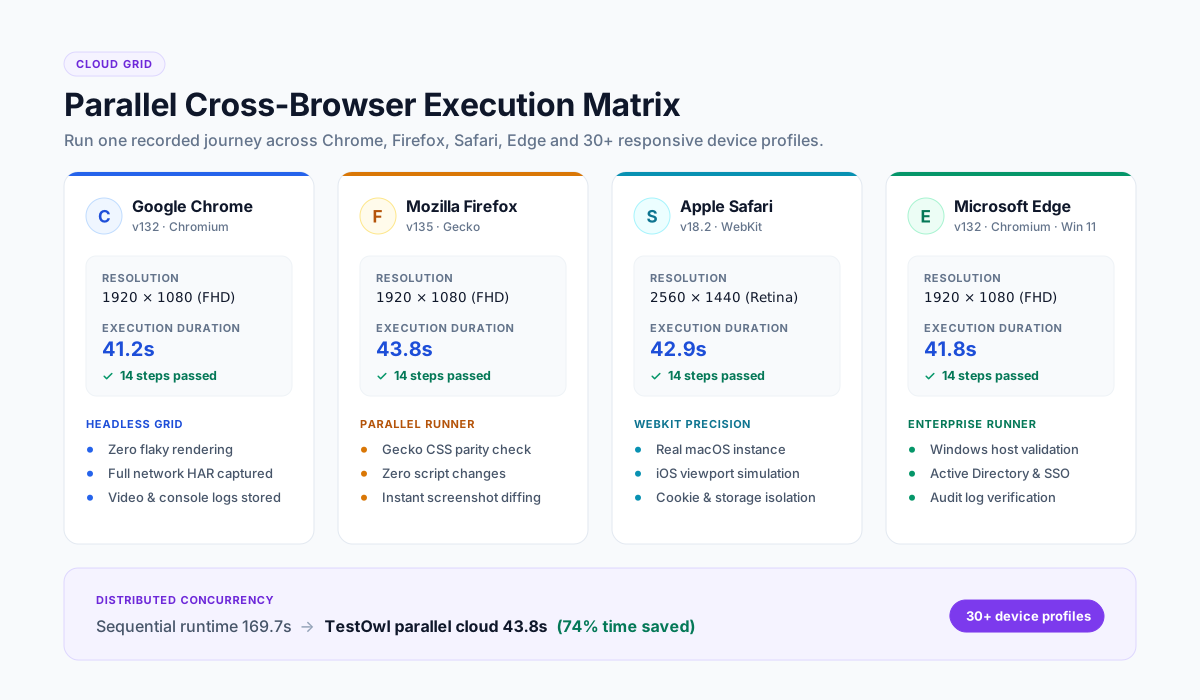
TestOwl sits in the no-code platform category, built for web applications. You record a journey once in the browser, and TestOwl produces a resilient test that runs in parallel across Chrome, Firefox, Safari and Edge and 30+ device profiles, heals itself when the UI changes, and explains the root cause when something genuinely breaks.
- Native handling of the hard DOM: Shadow DOM, nested iframes, drag-and-drop libraries, data grids such as AG Grid.
- Reusable Flows so shared journeys are maintained once.
- Encrypted Secrets and Masking Rules for credentials and sensitive data.
- Import of existing Selenium, Cypress and Playwright scripts.
- TestOwl Cloud or on-premise deployment.
- Plans from $299 to $1,999 a month depending on plan and team size, with a 4-week pilot on one real project.
Key takeaways
- There are five categories of test automation tool; most teams need two or three.
- The deciding factor is maintenance, not creation.
- Run the trial on your hardest screen and deliberately break the UI to test self-healing.
- Keep API and unit testing in code; move broad UI regression to a platform that maintains itself.
- A suite without a named owner will not survive two releases.
Explore Related Test Automation Resources
Frequently Asked Questions
Test automation tools are software that creates, runs and reports automated tests instead of a person executing them manually. They span open-source browser frameworks, no-code platforms, cloud device labs, API testing tools and performance testing tools.
There is no single best tool, because the categories solve different problems. Judge candidates on creation speed, self-healing, parallel execution, failure diagnosis, CI integration, data and secrets handling, reporting and reusability — measured in a trial on your own application.
A framework such as Selenium or Playwright gives you libraries to drive a browser from code; you build the structure around it. A platform provides recording, execution, healing, reporting and integrations as a product, so there is nothing to assemble.
Usually two or three: one for UI regression, one for API tests, and sometimes a performance tool. Adding more tools than owners is how test estates become unmaintained.
The licence is free; the time is not. Budget for framework setup, CI plumbing, reporting, and the locator repairs that follow every UI change. Compare that total against a subscription rather than comparing licence cost to zero.
A first test takes minutes on a no-code platform and days in a code framework. A useful regression suite for one product area takes a few days on a platform. With TestOwl, teams are typically running their own suites within 3 days.